
Reference Form Mappings are used to support Reference Field Mappings (where the target ServiceNow field is of type reference and the source record includes the ID of the corresponding record on the source platform). For example when setting the Caller field on a ServiceNow incident table, a Reference Form mapping based on the source and target User tables can be used to support this.
The following vendor platforms are supported when used as a source for a Reference Form Mapping:
BMC Remedy
HP Service Manager
Atlassian Jira
Salesforce
Cherwell
RSA Archer
SQL Server
Oracle
Most of the templates provided with Precision Bridge include the required Reference Form Mappings at the top of the mappings list. However, if the required reference mapping is not included, you can create your own. The reference mapping is used to match the records using a different field or set of fields so that the corresponding SYS-ID can be extracted and used in subsequent field reference mappings.
The Reference Form Mappings must be positioned to run BEFORE any other form mappings that reference it. Usually this means positioning towards the top of the mappings list like this:

In this case the Incident mapping includes references to users, groups and locations which are supported by the 3 corresponding reference mappings that precede it.
Simply follow the steps to create a new Form Mapping, (in this example, the source legacy User table, CTM:People is mapped to the target ServiceNow User table), then just map the fields required to uniquely match the corresponding records. Use a field or set of fields that uniquely identify the records. For example, for the User table, use the Full Name or Email Address. Try to avoid using lookup field mappings or reference field mappings in the Reference Form mapping unless you need them.

Then define a key mapping that is based on the same mapped fields like this:

The reference form mapping can now be used in subsequent user reference field mappings that are executed later in the same project. For example the Caller field on the Incident Form Mapping.
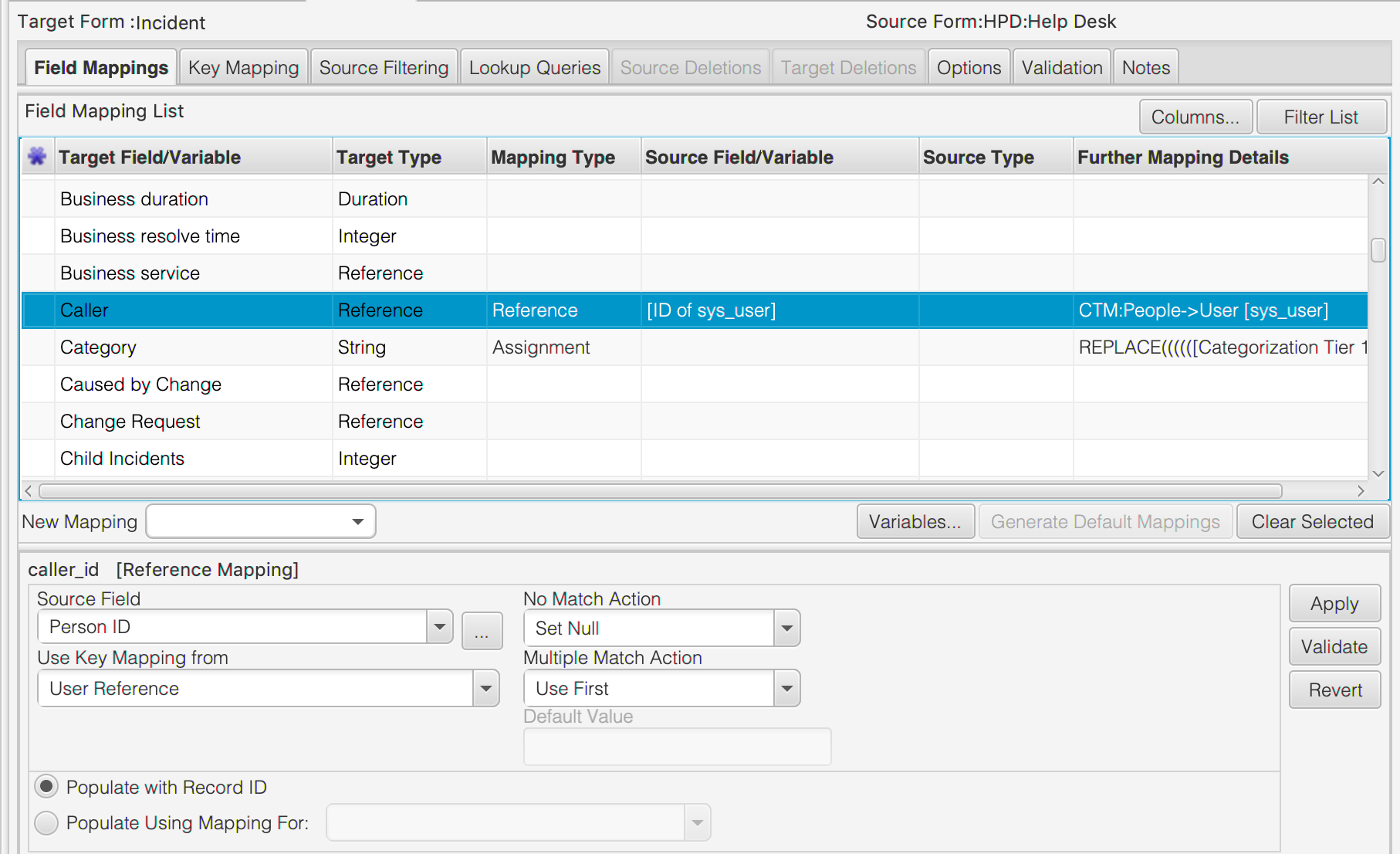
In this case, the source field holds the ID for the corresponding record in CTM:People so the reference mapping can be used to identify the SYS-ID of the corresponding User in ServiceNow. For more information on creating Reference Field mappings, see the corresponding article here.
Enabling and Disabling Reference Form Mappings
Case 1: Reference Form Mappings should always be enabled whenever the source platform is Atlassian Jira or HPSM.
Case 2: If the key mapping for the Reference Form Mapping is complex, for example, involves field reference mappings, temporary variables in assignment expressions or lookups then the Reference Form Mapping should be enabled.
Case 3: Sometimes it might also be more efficient in terms of performance to enable the reference mapping to ‘build’ the map of all source-to-target id’s. This might be the case if the number of records in the referenced table is small and the number of records being migrated is large. In this case the Reference Form Mapping should be enabled.
For all other cases the Reference Form Mapping can be disabled to optimise performance.
In all cases where the Reference Form Mapping is enabled, navigate to the Options tab and set the Entry Exists on Target Action and No Entry Exists on Target Action to Skip Entry like this:

Comments
0 comments
Please sign in to leave a comment.