
This method of filtering is useful if there is no previous migration set to relate to but you still want to restrict the records by relating them to another set of data.
To use this method, navigate to the Filter By Inclusion section on the Source Filtering Tab and select either ‘Source Ad-Hoc Query Set’ or 'Target Ad-Hoc Query Set' from the Value Set Definition Method.
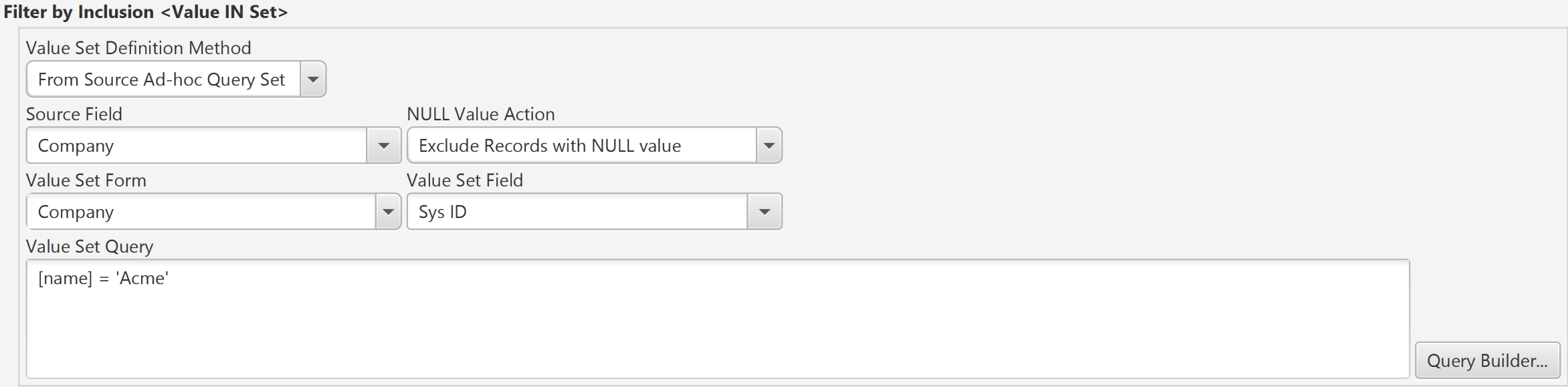
Source Ad-Hoc query Set
In this case, instead of selecting a previous migration, select a Value Set Form instead using the Value Set Form field. This allows you to select any form from the Source server. Then construct a query using the Query Builder to define the set of records that the Value Set (parent) is restricted to.
In the example above, only source records referencing the Company 'Acme' are migrated. Note that the sys_id is used since the source field 'Company' is a reference field and will hold the sys_id for the company.
Target Ad-Hoc query Set (Precision Bridge 6.0 or later)
In this case, the set of values that the source field must have for the record to be included in the migration set comes form a query run on the target server. For Service Now to Service Now migrations, care should be taken when using a reference field/sys_id match since the sys_id's on the target server may not necessarily be the same as on the source.
Use the Validate button to validate the Ad-Hoc Query and the Apply button to save.
If both an Inclusion Filter and a Source Filter Query are used, then only those records that satisfy BOTH queries will be returned. Note that the Source Count button only applies to the Source Filter Query and not to the Inclusion Filter.
Comments
0 comments
Please sign in to leave a comment.