
Migrating Data form an HP Service Management Database (running on SQL Server) into Service Now differs with migrating from any other SQL Server Database into Service Now. These differences are highlighted below.
Connection
Connecting to the HPSM Database is largely the same as connecting to any other SQL Server database (see section Creating a SQL Server-ServiceNow migration project for more info) The only difference is that the DB Type field should be selected as HP Service Management
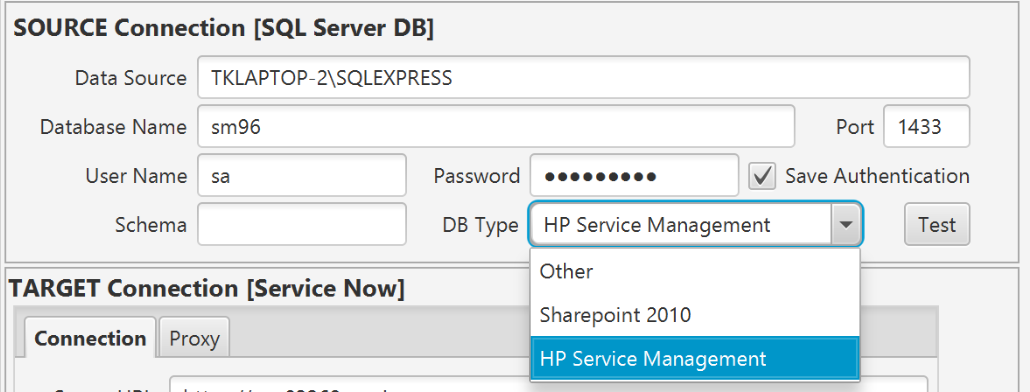
By selecting this database type, Precision Bridge will understand that the database should be treated as an HP Service Management database. This has implications in the method used for identifying the primary key of records and in the migration of attachments as explained below.
Configuring Primary Keys for HP Service Management Tables
Precision Bridge relies on each source table in the database having a defined primary key and only tables with a primary key can be used as a source. However, out of the box many tables in HP Service Manager do not have a primary key defined. To allow these tables to be used as a source , Precision Bridge can read a configuration file to explicitly define the primary key fields to be used for a table. In addition, defining the filename will allow attachment migration to work with this table.
Out of the box, Precision Bridge explicitly defines the following filenames and primary keys:
|
Table Name |
Table Alias (filename) |
Primary Key Fields |
|
PROBSUMMARYM1 |
probsummary |
NUMBER |
|
INCIDENTSM1 |
incidents |
INCIDENT_ID |
|
CM3RM1 |
cm3r |
NUMBER |
|
KNOWNERRORM1 |
knownerror |
ID |
|
KMDOCUMENTM1 |
kmdocument |
ID |
|
KNOWLEDGEM1 |
knowledge |
DOMAIN, ID |
|
APPROVALM1 |
approval |
UNIQUE_KEY, FILE_NAME, NAME, COMPONENT |
|
LOCM1 |
location |
LOCATION |
|
COMPANYM1 |
company |
CUSTOMER_ID |
This information is read in from the following file, which should not be edited:
<Install Folder>\resources\hpsm\db\TABLECONFIG.xml
To extend this to other tables, it is possible edit the file TABLECONFIG_CUSTOM.xml which exists in the following location:
<User Folder>\AppData\Roaming\HPSMConfig\TABLECONFIG_CUSTOM.xml
The file has the following format and contains the <TABLE> definition for PROBSUMMARYM1 as an example:
<HP_TABLE_CONFIG>
<TABLE fileName="probsummary" dbName="PROBSUMMARYM1">
<KEY_FIELD dbName="NUMBER"/>
</TABLE>
</HP_TABLE_CONFIG>
By adding additional <TABLE> elements, additional tables can be configured to be used as source tables with Precision Bridge.
Attachment Migration
Note that for a table to support attachments, the table must be defined in one of the configuration files (see section above) with its filename defined. It must also have a single primary key field defined.
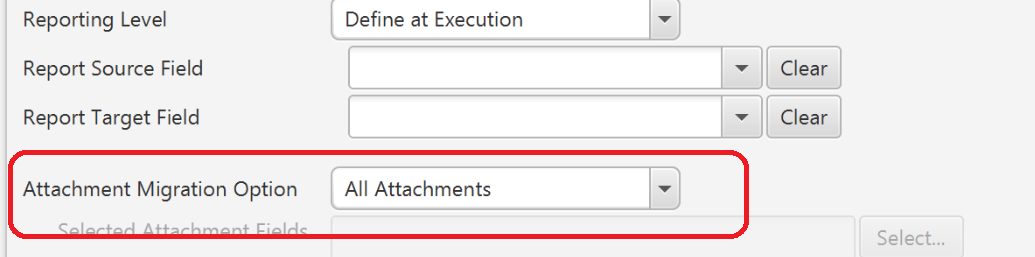
If the table has been configured to identify its filename (see above) it will support migration of any attachments associated with the migrated records. To include attachments, Use the Attachment Migration Option on the Options tab of the form mapping. If this option is disabled for a particular table, then it is likely that the table configuration record for this table is missing or invalid.
Comments
0 comments
Please sign in to leave a comment.