
After launching Precision Bridge and entering a ServiceNow URL as the source or target platform, you may find that the connection fails with a message like this:
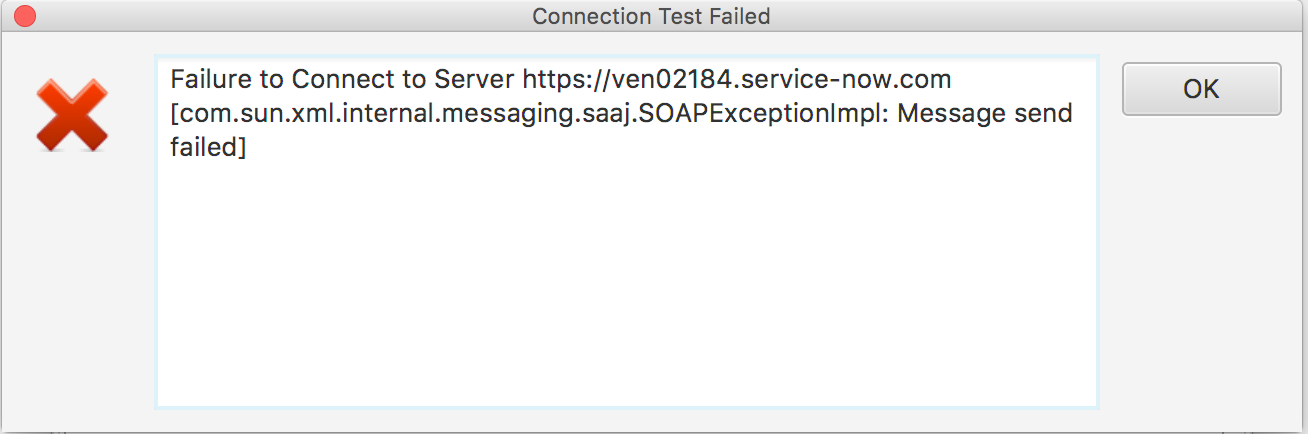
This can be caused by a number of things:
1. Check that there are no spaces or hidden characters at the start or end of the URL. This would cause the connection to fail.
2. Check that you can connect to the ServiceNow instance using a browser session from the same machine where Precision Bridge is installed.
3. If you normally connect through a proxy server, enter the Proxy connection details into the Proxy tab on the Precision Bridge connection window for ServiceNow.
4. Check if there is a firewall between the installed machine and the ServiceNow instance. If there is then you need to allow access for HTTPS by opening port 443.
5. Check that you are not connected to a VPN or other network that may prevent network access to the SN instance. If you are, disconnect from the VPN and try to connect again.
6. In some cases, depending on your Java configuration, you may need to add an SSL certificate to the Java Runtime Environment (JRE) on your local machine to allow access. To do this, follow the steps in this related article: Procedure to Add the ServiceNow SSL certificate to the Java Runtime Environment
7. If you still have problems connecting, use the create button on the connections window to regenerate the error (using the test buttons is not sufficient to generate the logs).
Then navigate to this folder on the machine where Precision Bridge is installed:
For Windows Machines:
C:\Users\<User name>\AppData\Local\PrecisionBridge
Note that the AppData folder is hidden, so you would need to check the ‘show hidden folders’ option in windows folder options to be able to browse to it in windows explorer.
For Macintosh:
Macintosh HD:\Users\<User name>\PrecisionBridge
Look for the file called error.log and take a copy.
Then navigate to the folder
<project location>/<project name>/logs/<project name.log>
to retrieve the project log file.
Send both log files to Precision Bridge support by submitting a ticket via the support portal.
Additional Troubleshooting Information:
1. Certificate Error
If either of the logs contain this message:
Caused by: sun.security.validator.ValidatorException: PKIX path building failed: sun.security.provider.certpath.SunCertPathBuilderException: unable to find valid certification path to requested target
then the likely cause is the certificate issue (point 6 above) Note also that if a proxy server is installed the same error may be recieved if the proxy server requires a certificate.
2. Proxy Error
If either of the logs contain this message:
‘Caused by: java.net.UnknownHostException:’
This may be caused by an incorrect url, but may also indicate that a proxy must be used (see point 3 above)
An error ‘407Proxy Authentication Required’ presented to the user indicates that the proxy URL is correct, but the user needs to enter username/password credentials to connect.
Comments
0 comments
Please sign in to leave a comment.