
Postgres can be used as either a Source or Target Server (subject to Licencing) If used as a target, the Precision Bridge Archiving Wizard can be used to generate target tables.
Postgres can also be used as an external lookup server or reporting target (see related links below)
To use Postgres as the Source Server, select Postgres DB from the Source Server Type dropdown.
To use Postgres as the Target Server, select Postgres DB from the Target Server Type dropdown.
Pre-requisites:
- Postgres JDBC Driver; First check that you have setup the path to the corresponding JDBC driver. See Configuring Access to a Postgres Database for more details.
The connection details will be displayed and must be completed as follows:
Data Source: The name, or IP Address, of the Postgres Server
Database: The name of the database you want to connect to
Port: The Listening Port configured for Postgres on the server. The default is 5432
User Name: The database user you will be connecting with. This user should have the required read/write privileges to the tables you will be working with. To be able to use Precision Bridge to generate tables for archiving, the user will also need CREATE privileges on the schema/database.
Password: The password for the above user
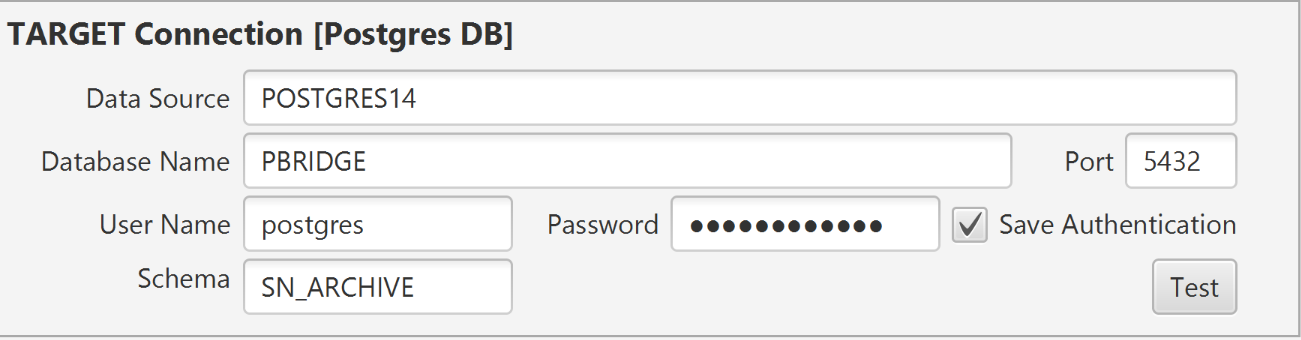
If you want to retain the login details for each instance, select the Save Authentication option. After selecting this option, the username and password are stored and do not need to be entered again the next time you open the same project from the same client machine. Otherwise you will need to re-enter them each time you open the project.
In order to check that the relevant servers can be accessed using the credentials provided, click on the Test button on the right for each connection.
If the selected server is reachable then a confirmation message will be displayed. If the server is not reachable then a failure/timeout message will be displayed. If the Postgres server is still not reachable, check that you can connect using the same credentials from a native Postgres client application such as PG Admin.
Related Articles:
Configuring Access to a Postgres Database
The Precision Bridge Archiving Wizard
Comments
0 comments
Please sign in to leave a comment.