
CSV can only used as a Source Server (subject to Licencing) or as an external lookup server (See section Configuring an External Lookup Server Connection for more information)
To use CSV as the Source Server, select CSV from the Source Server Type dropdown.
'CSV' can be defined as a source connection for a project, however using CSV is slightly different to using other server types. The CSV 'Server' is really a collection of definitions of the locations and structure of a set of CSV files that can be used to provide source data.
The following needs to be defined for the CSV Connection:
CSV : File Selection Method
By default, the 'Select Files Individually' option is selected meaning that you can select files from any location visible to the client. Best Practice, however is to use the second option to set a directory which will contain all the files you will be defining. Using this option means that if you want to re-point the project to another set of exported files (with the same names and structure) you simply need to change the root directory rather than individually re-selecting each of the files referenced.
CSV: Default File Encoding
The default file encoding can be changed if all your csv files use a specific character encoding other than UTF-8. care should be taken selecting this option as attempting to read files using the wrong character encoding can lead to unpredictable results. Check what encoding your files use before setting this.
CSV: Configuring CSV Source Files
You are required to configure the source files that you will be referencing in the project before the project can be opened. CSV Source Files cannot be configured while a project is open. You must configure at least one before the project can be created. There is more information on configuring CSV Source Files in the section Configuring CSV File Definitions
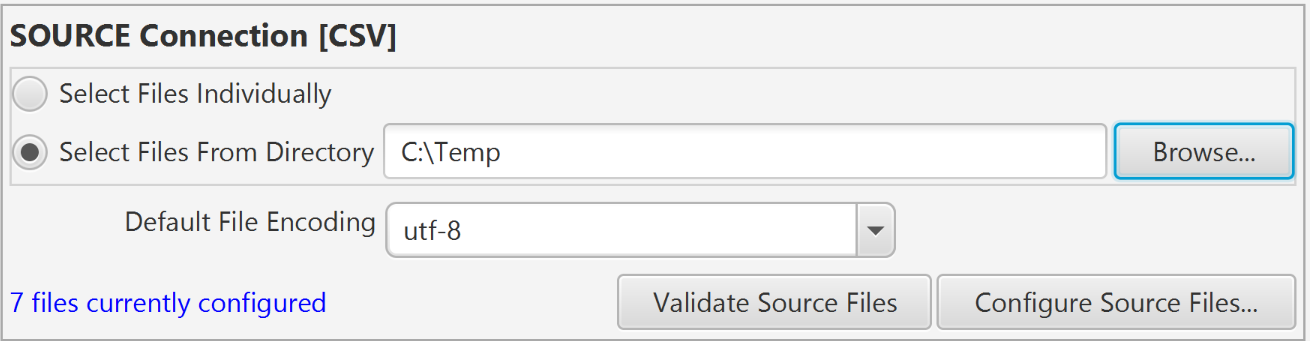
Clicking Validate Source Files runs a check for each of the configured files to confirm that the files defined exist and have the columns that have been defined in their definition. If errors are shown, open the CSV Definition indicated (using Configure Source Files...) and correct the issue.
Related Articles:
Configuring CSV File Definitions
Configuring an External Lookup Server Connection
Comments
0 comments
Please sign in to leave a comment.